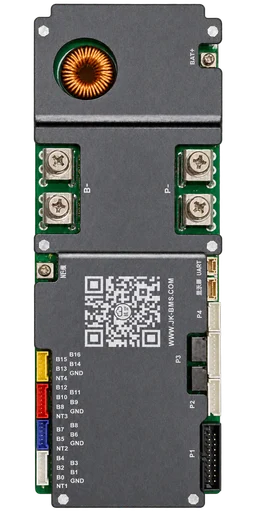
An RJ45 connector does not guarantee plug-and-play inverter communication. Every layer — BMS series and hardware revision, electrical interface (CAN vs RS485), cable pinout, protocol profile, bitrate/baud rate, DIP address, and inverter firmware — must match. Browse the full interactive table on JK BMS CAN/RS485 pinout & 14 inverter protocols.
Which JK BMS series is built for inverter communication?
For 48 V / 51.2 V residential and commercial battery storage, start with the JK-PB inverter BMS series (V19 or V24). On documented JK-PB V19.0.3 and V24.0.1 hardware, Bluetooth, CAN, RS485-1 (inverter port), RS485-2 (parallel cascade / PC software), and a display interface are standard on the communication interface board.
Board-level BMS families (such as JK-BD, JK-B2A, and JK-B1A) do not carry direct RJ45 inverter sockets and are not automatically covered by the JK-PB protocol table; they require model-specific confirmation and an interface board such as the P-Link-CR or RS485/CAN adapter module.
Documented JK-PB inverter protocol profiles (CAN & RS485)
The rows below reproduce the verified factory JK-PB protocol list (14 total profiles across 12 brands: 10 CAN and 4 RS485). Reported test records reflect the factory reference list, not a blanket guarantee for every inverter model or firmware build.
| Brand | Interface | Speed | Documented protocol | Reported device & settings |
|---|---|---|---|---|
| Deye | CAN | 500 kbit/s | Low-voltage hybrid inverter CAN communication protocol V1.0 | SUN-5K-SG03LP1-EU Battery Setup Menu: Lithium · Advanced Function: BMS_Err_Stop |
| Pylontech | CAN | 500 kbit/s | PYLON CANBUS Protocol V1.2 | Confirm in inverter manual |
| Pylontech | RS485 | 9600-115200 baud | PYLON low voltage RS485 Protocol V3.5 | Confirm in inverter manual |
| Growatt | CAN | 500 kbit/s | Growatt BMS CAN-Bus protocol low-voltage V1.08 | SPF 3000TL HVM-48 Program 05: LI · Program 36: 1 (CAN) |
| Growatt | RS485 | 9600 baud | Growatt xxSxxP ESS Protocol V2.01 | SPF 3000TL HVM-48 Program 05: LI · Program 36: 51 (RS485) |
| Victron Energy | CAN | 500 kbit/s | CAN-BUS_BMS_Protocol_201707 | Cerbo GX (GX communication device, not an inverter.) |
| GoodWe | CAN | 500 kbit/s | GoodWe LV BMS Protocol (CAN) V1.7 (ES/EM/S-BP/BP series) | GW5000-ES-20 Battery type: GoodWe / SECU-A5.4L*1 |
| SMA | CAN | 500 kbit/s | FSS-ConnectingBat-TI-en-10 Version 1.0 | Confirm in inverter manual |
| Voltronic Power | RS485 | 9600 baud | Voltronic Power Inverter and BMS 485 communication protocol 20200325 | Confirm in inverter manual |
| SRNE | RS485 | 9600 baud | PACE BMS Modbus Protocol for RS485 V1.3 | HF2430S60-100 Program 39: BMS · Program 32: BMS · Program 33: WOW |
| Luxpowertek | CAN | 500 kbit/s | Luxpowertek Battery CAN Protocol V01 | Confirm in inverter manual |
Key brand integration notes (US & EU buyers)
Victron Energy (Cerbo GX / GX devices)
The factory JK-PB list documents CAN-BUS_BMS_Protocol_201707 at 500 kbit/s, reported tested with Cerbo GX (a GX communication device, not an inverter itself). Confirm the BMS-Can port bitrate on the GX device matches 500 kbit/s, use a pinout-verified CAN cable between JK-PB CAN and the GX BMS-Can port, and confirm proper bus termination before enabling DVCC or automatic charge limits.
Deye low-voltage hybrid inverters
The factory JK-PB list documents Low-voltage hybrid inverter CAN communication protocol V1.0 at 500 kbit/s, reported tested on SUN-5K-SG03LP1-EU with documented inverter settings: Battery Setup Menu: Lithium and Advanced Function: BMS_Err_Stop. Verify that the cable connects JK-PB CAN-H / CAN-L / GND to the exact battery CAN pins specified in your Deye model's manual.
Growatt (CAN & RS485)
Both interfaces are listed in the factory JK-PB table, reported tested on SPF 3000TL HVM-48:
- CAN (500 kbit/s):
Growatt BMS CAN-Bus protocol low-voltage V1.08— documented settings:Program 05: LI,Program 36: 1 (CAN). - RS485 (9600 baud):
Growatt xxSxxP ESS Protocol V2.01— documented settings:Program 05: LI,Program 36: 51 (RS485).
EG4, Sol-Ark, and Sunsynk (important verification note)
EG4, Sol-Ark, and Sunsynk do not appear as individually named brand entries in the current factory JK-PB protocol table. Because regional OEM and hybrid inverter platforms vary by model, hardware revision, and firmware, we do not publish unverified pinouts or guessed firmware version numbers for those brands.
If you are integrating a JK-PB BMS with an EG4, Sol-Ark, or Sunsynk inverter, follow this four-step verification checklist before ordering cables or powering on:
- Check your inverter manual for which standard closed-loop battery protocol profiles it accepts over CAN or RS485 (many hybrid inverters document support for profiles such as Pylontech CAN V1.2 / RS485 V3.5, Deye CAN V1.0, or Luxpowertek CAN V01, all of which are listed in the JK-PB protocol table above).
- Compare your inverter's battery-communication RJ45 pinout diagram pin-by-pin against your exact JK-PB revision's RJ45 pinout below — never assume pin 4/5 or RS485 A/B match a straight Ethernet patch cable without checking both manuals.
- Match the CAN bitrate (
500 kbit/sfor most documented CAN profiles) or RS485 baud rate, set the single-pack or parallel master/slave DIP address according to your PB manual, and confirm clean SOC, pack voltage, current, and charge/discharge limits before enabling closed-loop control. - If your exact inverter model or firmware is not documented, contact JKBMS technical support with your BMS model/revision label and inverter model/firmware for confirmation.
Documented JK-PB RJ45 interface board pinout
Source: JK-PB2A16S-30P specification V19.0.3, interface board interface definition (verified models: JK-PB2A16S-30P). Hardware revisions can change connector pin numbering — always verify against the manual for your exact board label in the downloads library before wiring.
CAN port (RJ45)
| Pin | Signal | Definition |
|---|---|---|
| 4 | CANL | CAN signal negative |
| 5 | CANH | CAN signal positive |
| 7 | GND | Signal ground |
| 1, 2, 3, 6, 8 | NC | Not connected |
RS485-1 port (RJ45)
| Pin | Signal | Definition |
|---|---|---|
| 1, 8 | RS485-B1 | RS485 signal negative |
| 2, 7 | RS485-A1 | RS485 signal positive |
| 3, 6 | GND | Signal ground |
| 4, 5 | NC | Not connected |
On JK-PB boards, CAN and RS485-1 are for inverter communication, while RS485-2 is for parallel pack cascading (up to 16 units, DIP 0–15) or Windows PC monitor software via a compatible USB-to-RS485 adapter — never connect an RS485 RJ45 port directly to a computer Ethernet NIC.
Board-level BMS + P-Link-CR wiring principles
When connecting a supported board-level BMS through a P-Link-CR interface board, two documented rules prevent most commissioning failures:
- Use the reverse 4-pin cable (GH1.25-4P to GH1.25-4P, reverse, 30 cm (supplied with the P-Link-CR)): BMS P3 and P-Link P2 are numbered from opposite ends (BMS pin 1 CAN_L → P-Link pin 4 CAN_L; BMS pin 2 CAN_H → P-Link pin 3 CAN_H; BMS pin 3 RS485_A → P-Link pin 2 RS485_PC_A; BMS pin 4 RS485_B → P-Link pin 1 RS485_PC_B). A straight-through cable will not communicate.
- Use only the inverter sockets: Plug the inverter into the P-Link
CAN(pins 4/5) orRS485-EXT(pins 1,8 / 2,7) socket — never into eitherRS485-Pservice/parallel socket.
See the complete model-specific 4-pin tables (including reversed A1254WF-4A models where CAN sits on pins 3–4) on our CAN & RS485 pinout reference.
If inverter communication does not come up, check port selection, cable continuity, DIP address, and protocol settings first. Never cross-flash JK-PB V15 and V19 firmware — V15 and V19 are incompatible hardware families and wrong-family firmware damages the BMS. Compare revisions in our JK-PB V15 vs V19 vs V24 guide.
Recommended PB Inverter BMS, modules & cables
- JK BMS V19 PB2A16S20P — 16S 200A class, 2A active balance inverter BMS
- JK BMS V24 PB2A16S20P — 16S 200A class, 80V / -40 to 75 C, two-stage overcurrent
- JK BMS V19 PB2A16S30P — 16S 300A, 2A active balance inverter BMS
- JKBMS RS485 / CAN communication module adapter
- JKBMS P-Link-CR RS485/CAN interface & parallel board
- JKBMS USB-to-RS485 RJ45 adapter for Windows PC setup
- Browse all JKBMS inverter & service communication cables
Inverter compatibility FAQ
The factory JK-PB protocol list documents 14 protocol profiles across 12 brands (10 CAN and 4 RS485), including Deye, Victron Energy (Cerbo GX), Growatt, Pylontech, GoodWe, SMA, Luxpowertek, Voltronic Power, SRNE, INVT, MUST, and MEGAREVO.
No. EG4, Sol-Ark, and Sunsynk do not appear as individually named rows in the current factory JK-PB protocol list. Not listed means not verified by that document. Confirm which CAN or RS485 battery protocol your exact inverter model and firmware support (for example, Deye, Pylontech, or Luxpowertek profiles where documented by the inverter maker) and verify the RJ45 pinout before connecting.
Do not assume so. Even when both devices have RJ45 jacks, CAN-H, CAN-L, RS485-A, RS485-B, and GND pins vary by inverter brand and BMS hardware revision. Check the documented JK-PB pinout for your exact revision against your inverter manual before plugging in a cable.
No. Never cross-flash V15 and V19 PB firmware — they are incompatible hardware families and wrong firmware damages the BMS. Check the physical port (CAN vs RS485-1 vs RS485-2), cable pinout, DIP address, selected protocol profile, and bitrate/baud rate first.